Quick Hit: AI for Fun and No Profit
Building personal tools with LLMs when there's no product, no users, and no business case.
Most of the chatter on LLM coding is focused on integrating those tools within existing companies/products or using them to vibe code a new startup. I’ve dabbled in those spaces myself but lately I’ve enjoyed a third path: building tools for myself, with no intention of expanding, packaging, or selling them.
This piece is a lot less in depth and heady than what I usually write but I thought it might be fun to showcase a couple of recent use cases.
Building for a single user removes a lot of the (more boring) complexity
Obvious, but when your only user is yourself, a large category of complexity disappears. No authentication. No multi-tenancy. No load considerations. No error handling for edge cases you’ll never hit. No accessibility requirements. No compliance review. The engineering concerns that make software hard aren’t usually about functionality, they’re about other people, and when there are no other people, you’re just solving your own problem in whatever way is most direct.
Quick note on my stack
Right now I’m using Claude (at the $100/month tier). Below I’ll reference Claude Cowork and Claude Code. Claude Cowork is part of Claude’s desktop app and can access your computer’s file system (renaming files in a messy directory, creating and saving out spreadsheets, that kind of thing). Claude Code is a CLI tool that runs in your terminal also with file system access. If I need to make changes myself my IDE is Visual Studio Code, though in the use cases below that’s been pretty rare.
Nothing here is particularly unique to Claude. Most coding LLM tools would handle this kind of small personal project fine.
Disposable Software: Use Case One, Conference “Cheat Sheet”
I’m pretty bad at networking at conferences. Often I’ll go with lofty intentions but once on the ground and without clear or actionable goals I’ll slink off and end up working on my laptop or end up at the bar chatting with someone from the unrelated “realtor” conference at the same venue.
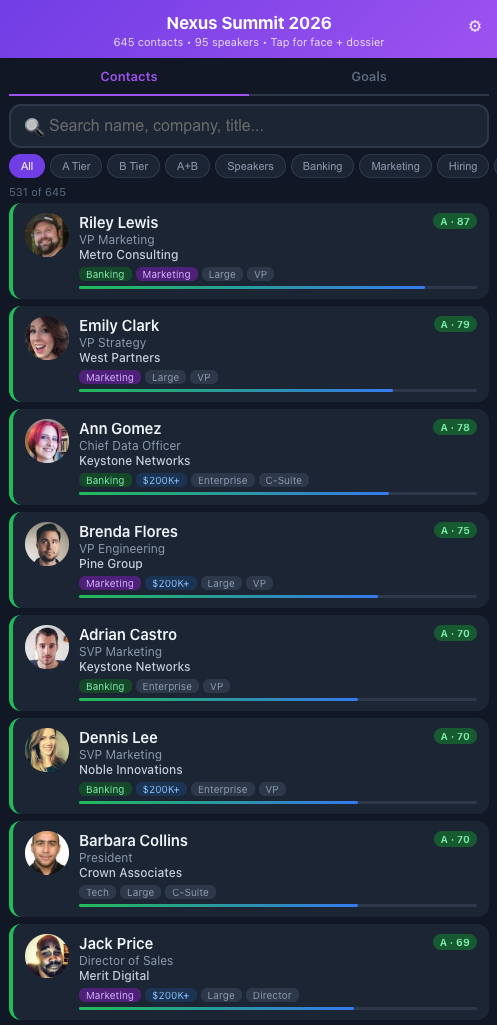
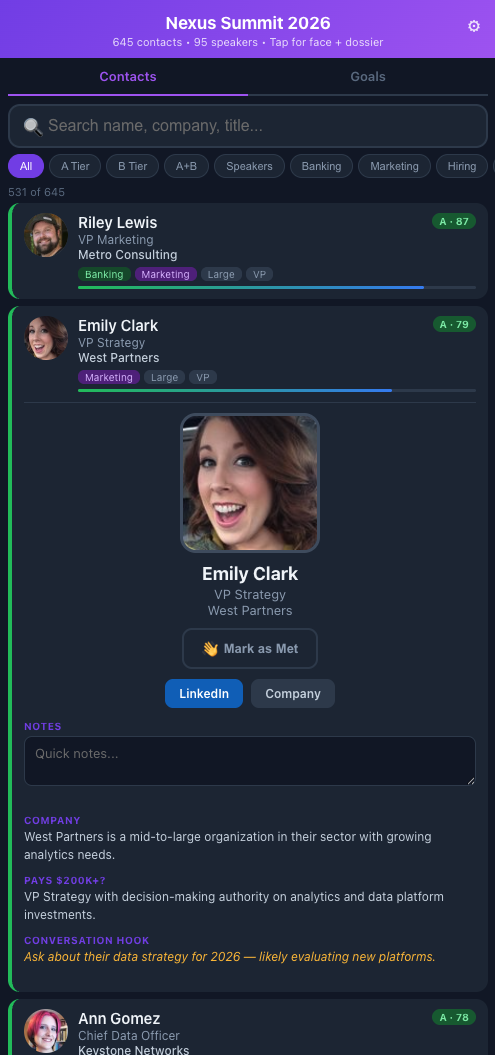
Demo version at olberding.me/conference-tool-example
Starting in Claude Cowork (a mistake I’ll explain in a moment), I had Claude pull the attendee and speaker list from the conference website (authenticated), enrich each person with company data, LinkedIn profile, job title, and a photo pulled via Playwright automation, then rank and tier every contact against my stated goals for the event. The output is a single HTML file I can load on my phone: tap a card to see a conversation starter, mark someone as met for followups later, jot a note after talking to them.
Key features:
- Tiered and tagged contacts scored against my stated goals, so the highest-value conversations surface first
- Tap-to-expand cards with role context, company background, and a suggested conversation opener for each person
- Profile photos for recognition
- Mark as met so I know who to circle back with after the event
- Quick notes per contact after a conversation, what you talked about, any follow-up items
- Search and filter by name, company, tier, or met status
The whole thing is 250KB. No backend, no database. Using localStorage for the small amount of data collection, which obviously wouldn’t work in most cases but I just need it on a single device for a week. I pushed it to a subdirectory on my personal site on GitHub Pages because it’s basically just an HTML page.
I started this in Cowork because initially I had just planned on getting some help identifying the top few targets, but as the scope grew (photo scraping, company URL resolution, PWA manifest, filtering logic), I ended up moving it over to Claude Code, where I should have started the project anyway.
You can see a sanitized demo version at olberding.me/conference-tool-example if you want to poke at it. Fake names, companies, and photos so I can share here, but the functionality is intact.
Use Case Two: Personal Digest
Aggregating news and articles isn’t novel. There are plenty of existing tools for this, but I wanted to customize a feed deeply and use an LLM for analysis in ways no off-the-shelf tool would let me.
Key features:
- RSS feeds, subreddits, and podcasts with per-source quality priors configured in YAML
- Interest tiers with explicit “covers / does not cover” boundaries and quality signals that boost practitioner content and penalize vendor marketing
- Local LLM triage (llama3.1:8b via Ollama) scoring each item 1–5 for relevance and auto-rejecting press releases, listicles, and vendor content before anything hits the analysis step
- Each surviving article gets an analytical summary, a “why it matters” note, a contrarian flag where relevant, and a shelf-life estimate
- Podcasts are auto-downloaded, transcribed locally via Whisper, and analyzed separately with a prompt tuned to extract key claims and surface contrarian takes
- A source diversity cap (max 2 items per source) so no single outlet dominates the digest
- Weekly Saturday edition that includes longer-form content that doesn’t make the daily cut
- A web interface for editing sources, reviewing pipeline logs, and monitoring the pipeline visually (how many items were fetched, survived triage, completed analysis, and are queued for the digest) plus source quality indicators over time
The system monitors those sources, runs everything through the local LLM for initial scoring and filtering, and then passes surviving items to a scheduled Claude Cowork task for actual analysis. The output is an email that lands in my inbox by 5am: a curated set of articles and podcast summaries.
The podcast handling is the part I find most useful. Each episode gets auto-downloaded overnight and transcribed locally via Whisper. The analysis prompt is tuned specifically to surface contrarian viewpoints and extract the key claims, with the explicit goal of letting me decide whether the episode is worth an hour of my time or whether the summary is sufficient. Most of the time, the summary is sufficient.
The analysis step has a useful wrinkle: rather than calling the Claude API directly and incurring per-token costs, the pipeline exports pending items to a JSON file, a scheduled Cowork task picks them up, analyzes them, and writes results back to another JSON file that the next pipeline run imports. Frontier-model analysis at zero marginal cost, piggybacking on a subscription I’m already paying for.
Building for yourself
This isn’t a how-to guide. There are almost certainly better ways to approach both of these. But “better” in software usually means more maintainable, more scalable, more generalizable, and none of that applies when you’re building for yourself. The hard decisions don’t need to be made.
The conference tool is a one and done, the personal digest I’ll continue to tweak and refine but the quality of what hits my inbox is pretty good today - though I should move it over to my Mac Studio instead of running from my MacBook. I haven’t come to terms with paying actual infrastructure and API costs for little projects like this just yet.
Building these personal projects has been fun without the stress. I have a few more that are in use as well and while there are well known issues with the idea that you can just vibe code your way with slop to a production ready and profitable app/business, it’s certainly useful when the stakes are low.